


Securus Mobile
4.711.51K Reviews
App Specs
- Version
- 5.2.0 (build 5)
- Updated On
- License
- Free
- Downloads
- 5,000,000+
- Developer
- Securus Technologies, LLC
- Categories
- Communication
- Platform
- Android, iOS
Screenshots
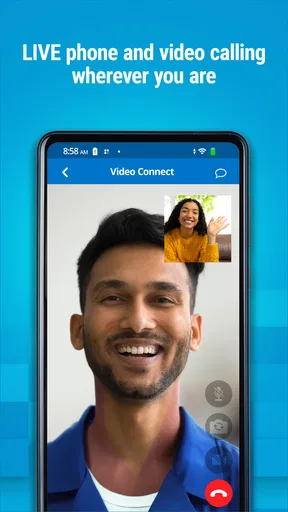
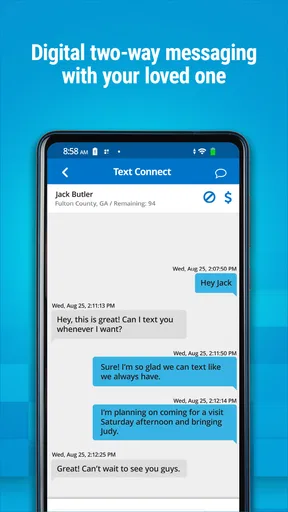

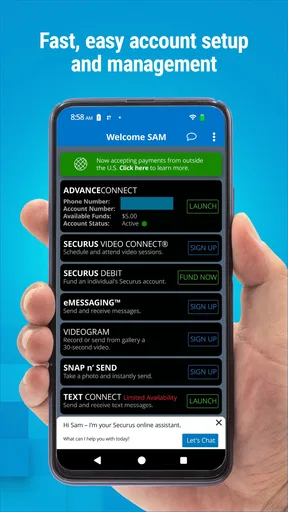
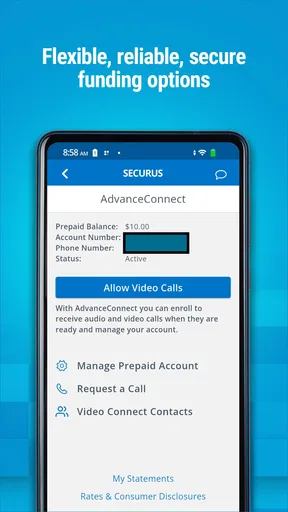


 Analysis by AppCompare
For families trying to arrange calls or video visits with someone in a correctional facility, the hardest part is often not deciding to connect; it is working through the practical steps around accounts, funding, and timing. That is the specific problem Securus Mobile is built around. I see it as a purpose-focused communication app: useful when your contact already relies on Securus services, but not a general-purpose way to keep up with every friend or relative.
Start with the connection you need
Before installing it, I would first make sure the person I want to contact can use the relevant Securus services and that I know which kind of connection I am arranging. The app is designed to manage and fund calling accounts and to schedule and join video sessions. That makes the starting point different from ordinary messaging apps: the goal is not to discover people or start a casual chat, but to make a particular call or video visit possible.
This distinction matters if you are comparing it with a familiar alternative such as a standard video-calling app. Those apps are usually easier for everyday conversations when both people can freely install and use them. Securus Mobile is more relevant when the call or video session needs to fit the services available to the person you are contacting. I would not install it expecting it to replace texting, social messaging, or family video calls in general.
From account preparation to a scheduled session
The practical flow begins with account management. I would check the calling-account details and funding before relying on a call, rather than waiting until the moment I hope to connect. Treating those tasks as preparation helps avoid a frustrating last-minute scramble: a scheduled conversation is only useful if the account side is ready as well.
For a video visit, the next step is to arrange the session and then return to the app when it is time to join. That makes the calendar and the account part of one routine. I would keep the appointment information somewhere easy to find and set myself a reminder outside the app if I tend to lose track of scheduled commitments. The useful habit is to separate “I have arranged this” from “I am ready to join”: checking the session details and account beforehand gives you a better chance of being prepared.
One realistic example is a relative who has a short window between work and other responsibilities. They can set aside time for a video session, make sure the calling account is funded ahead of that window, and have the app ready before the appointment. If another family member is helping, it is worth agreeing who will manage the account and who will handle the calendar reminder. That small handoff can prevent duplicate effort or confusion about whether everything is ready.
The app is free to download, but that should not be confused with every call or visit being free. The important practical question is how the account and the specific service are funded, so I would review the account details before making plans. I would also confirm that the device’s operating system is compatible: the current version is 4.8.5, build 10, and it requires iOS 11 or later.
Worth Reading Before You Choose

EA SPORTS FC Mobile 26 Is a Bigger Football Game, but It Takes Time

Flipboard Shows What News Apps Must Do Beyond the Feed

Switching to Android Auto Means Rethinking Your Driving Routine

Google Calendar Makes a Crowded Week Easier to Manage

Ludo King Makes the Most of the Minutes Between Plans

Baby Panda World Brings Quick Play to Modern Phones, but Its Game Library Feels Busy
Where family coordination helps
Securus Mobile is most useful when one person takes responsibility for the administrative side and communicates the plan clearly to everyone else involved. For example, a relative coordinating a video visit may need to tell another family member when it is scheduled, who will be joining, and whether the account preparation is complete. The app supports the central service workflow, but clear communication among relatives still matters; it is not a substitute for deciding who is doing what.
That is also where I see a trade-off compared with ordinary communication tools. A general messaging app can make it easy to send a quick update to a group, while a service-specific app can keep the account and session tasks closer to the call itself. If your family already uses another channel to share reminders, there is no reason to abandon it. I would use the tool that is best for each job: Securus Mobile for the relevant account and session steps, and the family’s usual method for coordinating plans.
The app is published by Securus Technologies, LLC, and it sits in the communication category. It is free and carries a Teen content rating. Those details make it accessible to people looking for a dedicated way to handle these tasks, but the real deciding factor is whether the person you need to reach uses the associated services. If not, the app is unlikely to solve your communication problem.
Useful preparation, with realistic expectations
A small but useful tip is to do administrative tasks when you are not under time pressure. Review the account and funding before the day of a planned call, and check the session information before the time arrives. If a relative is helping, agree on one person to verify readiness rather than assuming someone else has done it. These habits are not flashy features, but they make a service-dependent workflow less stressful.
Another practical consideration is keeping the app’s role narrow. It is designed around calls and video sessions, not as a family location-sharing tool or a general safety tracker. That distinction is important because a reader who expects maps, geofencing, or check-in messages would be looking for a different kind of product. I would choose a conventional family-safety app for those needs and a standard messaging or video-call app for ordinary conversations.
There can also be friction when a plan depends on several pieces lining up: account readiness, the scheduled session, the device, and the people involved. If a call does not go as expected, I would check those pieces one at a time instead of assuming the app itself is the only cause. Confirm the account status, revisit the session details, and make sure the device is ready. This kind of simple troubleshooting is more useful than repeatedly tapping around without knowing which part of the process needs attention.
Getting Started with Securus Mobile
Jumping right into Securus Mobile is straightforward. The app is available for both Android and iOS, and downloading it is as easy as pie. Once installed, you’ll find an intuitive interface that doesn’t require a tech genius to navigate. After setting up my account, I was quickly able to add family members to my network. This process was smooth, and within minutes, I was ready to explore all the features.
Features That Stand Out
One of the first things that caught my eye was the real-time location tracking. It’s like having a virtual guardian angel watching over your loved ones. You can see where everyone is on a map, which is incredibly handy, especially if you have kids and want to ensure they’re safe. The app updates locations frequently, so you’re never left in the dark.
Another feature worth mentioning is the geo-fencing. This allows you to set up virtual boundaries. When someone enters or exits these boundaries, you get an instant alert. It’s perfect for setting up safe zones around schools or homes. I tested this with my neighborhood, and it worked flawlessly every time.
The check-in feature is also a neat addition. Family members can send a quick check-in message to let you know they’ve reached their destination safely. It’s a small gesture, but it offers a big reassurance.
User Experience and Interface
The user interface of Securus Mobile is clean and user-friendly. Everything is laid out logically, so you’re not scrambling to find what you need. The app performs smoothly without any noticeable lags, which is always a plus. Navigating through different features is a breeze, making it accessible even for those who aren’t tech-savvy.
One thing I particularly appreciated was the notifications. They are timely and informative without being overwhelming. You can customize these alerts to suit your preferences, which adds a nice personal touch to the overall experience.
Security and Privacy
Now, let’s talk about something crucial—security and privacy. With an app like this, you want to ensure that your data is protected. Securus Mobile does a commendable job of keeping your information secure. The app uses encryption to safeguard data and provides clear privacy policies. I felt comfortable knowing that my family’s data wasn’t being compromised.
Final Thoughts
So, would I recommend Securus Mobile? Absolutely. It’s a robust app that delivers on its promises, providing peace of mind with its reliable features. Whether you’re a parent wanting to keep track of your kids or someone who values staying connected with family, this app is worth checking out. The mix of real-time tracking, geo-fencing, and user-friendly design makes it a standout choice.
In a world where we all strive for a little more security and peace of mind, Securus Mobile delivers just that. So why not give it a try? You might find it becomes an indispensable part of your daily routine, just like it did for me.
Who should choose it—and who should not
There is a clear audience for this app: people who need to manage a Securus calling account or arrange and join a Securus video session. For them, a dedicated app can make the administrative steps easier to keep together than relying on scattered notes and reminders. It is especially helpful for relatives who are coordinating contact over time and want a repeatable routine rather than starting from scratch before every call.
I would steer away from it if you are simply looking for a free alternative to everyday video chat, or if you expect it to act as a social network, family locator, or all-purpose messenger. Its value depends on needing the services it is built to support. That is a narrower purpose than many communication apps, but a narrower purpose can be a genuine advantage when it matches your situation.
What to expect from the app’s track record
Securus Mobile has an average rating of 3.6 from around 29,000 ratings, and it has been installed over 5 million times. Those figures suggest that many people have tried it, while the rating also signals that the experience may not be uniformly smooth for everyone. I would treat that as a reason to approach it with practical expectations: it can help manage a specific communication process, but it cannot remove every dependency involved in arranging a call or video session.
The app has been available since August 13, 2015, and its current version is 4.8.5, build 10. A long-running app can be familiar to established users, but what matters most to a new user is whether the current version works with their device and serves the immediate need. The minimum operating-system requirement is iOS 11, so checking compatibility before planning around it is sensible.
Making the routine less stressful
My best advice is to build a simple sequence and use it consistently: handle account preparation first, keep the session plan visible, and open the app with enough time to deal with ordinary setup friction. If more than one relative is involved, choose one person to be the point of contact for the details and share the confirmed plan with everyone else. This reduces the chance that two people assume the other has funded or checked the account.
It is also worth thinking about what happens if the preferred plan changes. Keep your family’s usual way of passing along updates available, so a change in timing does not leave someone waiting without context. The app can be the place for its supported account and session tasks, while a separate call or message can handle coordination between relatives. That division of labor is practical and avoids expecting one app to do every job.
In the end, I would recommend Securus Mobile to someone who needs its particular calling and video-session workflow and is willing to prepare the account and schedule with care. I would not recommend it as a general communication upgrade for a family that already relies on ordinary messaging and video calls. Used for the right purpose, it gives a dedicated route through important practical steps; used for the wrong one, its specialized focus will feel limiting.
Pros
- User-friendly interface for easy navigation.
- Real-time location updates enhance safety.
- Customizable alerts for specific activities.
- Secure login ensures privacy protection.
- Comprehensive family tracking features.
Cons
- Limited free features; subscription required.
- Battery consumption can be high.
- Occasional location inaccuracies reported.
- Requires constant internet connection.
- Some features need frequent updates.
FAQs for Securus Mobile
What features does Securus Mobile offer to its users?
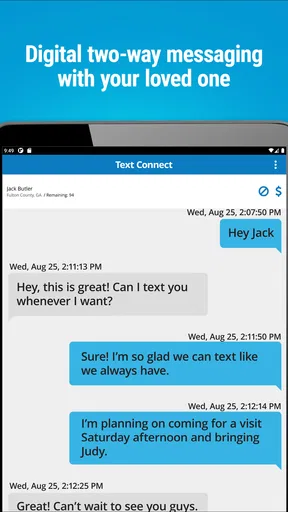
Securus Mobile provides a comprehensive suite of features designed to enhance user safety and connectivity. Key features include real-time GPS tracking, secure messaging, easy access to calling services for inmates, and convenient account management. Users can also set up notifications for important updates and utilize video visitation features, making it a versatile tool for staying connected.
How secure is the Securus Mobile app?
Security is a top priority for Securus Mobile. The app implements robust encryption protocols to protect user data and ensure privacy. Regular updates are rolled out to address vulnerabilities and enhance protection. Users are encouraged to enable two-factor authentication for an additional layer of security, ensuring peace of mind while using the app.
Is Securus Mobile compatible with all devices?
Securus Mobile is compatible with a wide range of devices. It supports both Android and iOS platforms, ensuring broad accessibility. The app requires a stable internet connection for optimal performance. Users should ensure their device meets the minimum OS requirements and has sufficient storage space to facilitate a smooth installation and user experience.
Are there any costs associated with using Securus Mobile?
While downloading Securus Mobile is free, certain features within the app may incur costs. For example, video visitations and specific messaging services might require purchasing credits or a subscription. Users are advised to review the pricing details within the app to understand any potential charges and manage their usage accordingly.
How user-friendly is the Securus Mobile app?
Securus Mobile is designed with user-friendliness in mind. The app features an intuitive interface with straightforward navigation, making it accessible even for those less tech-savvy. It offers clear instructions and support options to assist users in navigating its features effectively, ensuring a seamless experience from setup to everyday use.


